The Beginner’s Guide to Create a Wireframe
Are you new to web or app design? Feeling a bit overwhelmed by all the talk of UX, UI, and user flows? Don’t worry, you’re not alone!
This create a wireframe beginner’s guide will show you how to start planning your projects. We’ll go through each step together, so you can learn like a pro.
What is a Wireframe?
So, what exactly is a wireframe? In its simplest form, a wireframe is a blueprint for your website or app. It’s a visual representation of the layout, content, and functionality. Think of it like an architect’s plan for a building.
Why should you create a wireframe before designing?
Imagine building a house without a blueprint. You might end up with rooms in the wrong place, doors that don’t lead anywhere, and a whole lot of wasted time and money. Creating a wireframe before designing allows you to:
- Plan your content: Determine what content is essential and where it should be placed.
- Structure the user flow: Ensure users can easily navigate the site or app and find what they’re looking for.
- Identify potential usability issues: Spot any confusing elements or navigation problems early on.
- Save time and money: Avoid costly revisions later in the design process. It’s much easier to move boxes on a wireframe than redesign a fully coded page.
- Get early feedback: Show a wireframe to clients or stakeholders. It’s a good way to get feedback and make changes. This happens before you start on the visual design.
Benefits of Creating a Wireframe
The benefits of wireframing are numerous:
- Improved Communication: Wireframes provide a clear and concise way to communicate your vision to clients, developers, and other stakeholders.
- Enhanced User Experience: Wireframes make websites and apps easier to use. They focus on how users interact with the site.
- Reduced Development Costs: Finding problems early saves time and money. It makes the development process smoother.
- Faster Design Process: Wireframes give designers a clear starting point. This makes the design process quicker and more effective.
- Better Focus on Functionality: Wireframes help you focus on what your site or app does. They keep you from getting lost in details too soon.
Wireframe vs. Mockup vs. Prototype
It’s easy to get these terms confused. Here’s a quick breakdown:
- Wireframe: A low-fidelity visual representation of a website or app’s structure and layout. It focuses on functionality and content placement.
- Mockup: A mid- to high-fidelity visual representation of the design, including colors, fonts, images, and other visual elements. It shows how the final product will look.
- Prototype: An interactive version of the final product. Users can click through the interface and see how it works. It shows how the final product will work.
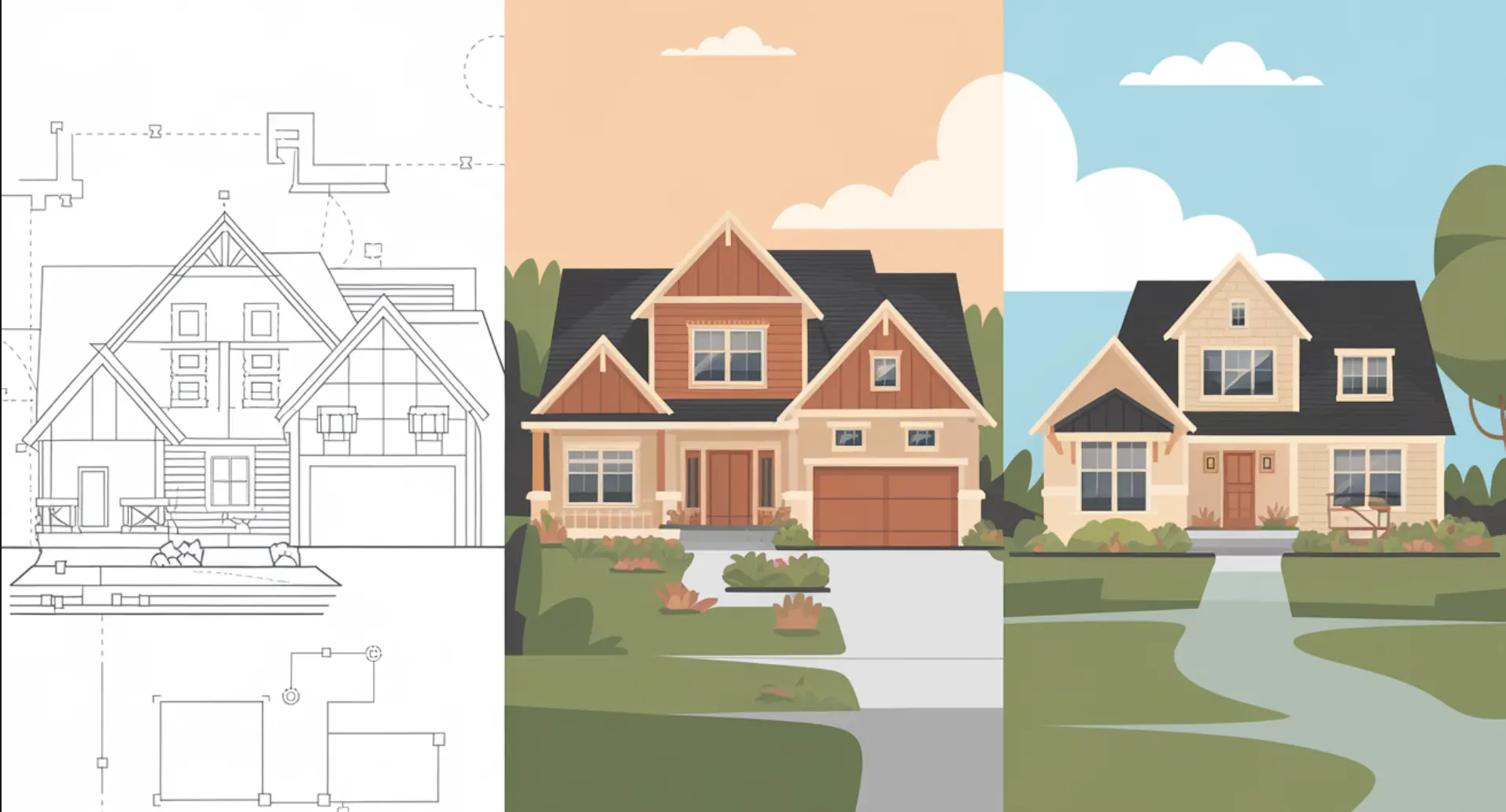
Think of it this way: A wireframe is like a blueprint. A mockup is like an architectural rendering. And a prototype is like a model home.
Types of Wireframes
Not all wireframes are created equal. They come in different levels of detail, often referred to as fidelity. The two main types are low-fidelity and high-fidelity.
Low-Fidelity Wireframes
Low-fidelity wireframes (or “lo-fi” wireframes) are basic sketches. They are quick and easy to create, focusing on the overall structure and layout. Think of them as quick and dirty ideas on paper or using a very simple digital tool.
They use simple shapes, lines, and placeholders for text and images. They are not meant to be visually appealing, but rather to communicate the core functionality and content placement.
When to use them: Low-fidelity wireframes are best used in the early stages of a project. They are perfect for brainstorming ideas, quickly testing different layouts, and getting early feedback. If you’re not sure what to do, try making quick, simple wireframes. They can help you decide and make a choice that feels right.

High-Fidelity Wireframes
High-fidelity wireframes (or “hi-fi” wireframes) are more detailed and refined. They include more specific information about the user interface (UI), such as fonts, button styles, and image placeholders. While they still don’t have the full visual design, they offer a much clearer picture of how the final product will look and function. Some are even interactive.
When to use them: High-fidelity wireframes are best used later in the design process. This is after the overall structure and layout have been established. They are helpful for:
- Presenting to clients for approval.
- Testing specific interactions and user flows.
- Providing detailed specifications for developers.
- Testing the layout on different screen sizes.

How to Create a Wireframe: A Step-by-Step Guide
Ready to start creating your own wireframes? Great! Here’s a simple, step-by-step guide to get you started:
Step 1: Define Your Project Goals
Before you even think about drawing a line, ask yourself: What are you trying to achieve with this website or app? What are the key goals? Understanding your goals will help you prioritize content and functionality in your wireframe.
What are the goals of creating a wireframe?
It’s important to know what you are looking to achieve when you create a wireframe. Different projects have different needs, here are the most common goals when creating a wireframe:
- Clearly outline user flows.
- Better understand the layout of a project.
- Identify potential challenges or roadblocks that users might face.
- Focus the project in a specific direction.
- Show stakeholders where the project is going.
Step 2: Research and Plan Your Content
What information will your website or app need to present? What are the key messages? Gather all your content – text, images, videos – and organize it logically. This will make it much easier to decide where everything should go in your wireframe.
Plan your content before creating a wireframe
Before you start planning a wireframe, think about the information and media your website will need. Organising it logically is key. It will then be much easier to decide where everything should go in your wireframe.
Step 3: Choose Your Wireframing Tool
There are many wireframing tools available, from simple paper and pencil to sophisticated software. Choose a tool that suits your skill level and project needs. We’ll explore some popular options in the next section.
Tips for choosing the right wireframing tool to create a wireframe
A good start would be considering your skill level and your project’s requirements. Another good option is a tool’s usability, it has to be easy to use. Many tools offer a free trial, try them!
Step 4: Sketch Your Initial Ideas (Paper or Digital)
Don’t be afraid to get messy! Start by sketching out your initial ideas on paper or using a digital sketching tool. This is the time to experiment with different layouts and user flows. Focus on the big picture, don’t worry about the details yet.
Sketching Your ideas before creating a wireframe
The first ideas are sometimes the best. Don’t skip this step. Sketching ideas before creating a wireframe is key. It helps you see everything you think of, and write it down.
Step 5: Create Your Wireframe (Using Your Chosen Tool)
Now it’s time to bring your sketches to life using your chosen wireframing tool. Start with the basic structure and layout, then add in the content and functionality. Use placeholders for images and text.
How to use different tools to create a wireframe
There are many different wireframing tools, and it all depends on your project and preference. The main thing is to try different tools, use different tools, and stick with what you feel comfortable with.
Step 6: Get Feedback and Iterate
Share your wireframe with clients, colleagues, or potential users and get their feedback.
What works? What doesn’t? What could be improved? Use this feedback to refine your wireframe and make it even better.
Getting feedback for creating a wireframe
One of the most important parts is feedback. Feedback helps you to see where you can improve your website design, change, add and remove. Make sure that you share you wireframe to receive feedback.

Choosing the Right Wireframing Tool
One of the most common questions beginners have is: “What wireframing tool should I use?” The answer depends on your budget, skill level, and project requirements. Here’s a brief overview of some popular options:
1. Figma
- Pros: Free plan, excellent collaboration, user-friendly interface, wide range of features.
- Cons: Requires an internet connection, can be overwhelming for beginners due to its extensive features.
Link: https://www.figma.com/
2. Adobe XD
- Pros: Integrates well with other Adobe products, robust features, good for both wireframing and prototyping.
- Cons: Paid subscription required, steeper learning curve than Figma.
3. Balsamiq
- Pros: Easy to learn, fast to use, great for quickly sketching out ideas, focused on low-fidelity wireframing.
- Cons: Limited features compared to other tools, not suitable for high-fidelity designs.
Link: https://balsamiq.com
4. Miro
- Pros: Excellent collaboration features, versatile tool for various design activities, flexible and easy to use.
- Cons: Not specifically designed for wireframing, can be less precise than dedicated wireframing tools.
Link: https://miro.com/
5. Sketch
- Pros: Powerful features, large community, extensive plugin ecosystem.
- Cons: Mac-only, paid subscription required, steeper learning curve.
Link: https://www.sketch.com/
Top free wireframe tools to create a wireframe
- Figma (limited features)
- Miro (limited features)
- Draw.io
- Canva
Paid wireframe tools to create a wireframe
- Adobe XD
- Sketch
- Balsamiq
Best Practices for Effective Wireframing
To make the most of your wireframing efforts, keep these best practices in mind:
- Keep it Simple: Don’t overcomplicate your wireframes. Focus on the essential elements and avoid adding unnecessary details. Less is more.
- Focus on Functionality, Not Aesthetics: Wireframes are about structure and user flow, not visual design. Resist the urge to add colors, fonts, or images.
- Use Clear and Consistent Labeling: Use clear and consistent labels for all elements in your wireframe. This will help ensure that everyone understands the design.
- Prioritize User Experience: Always keep the user in mind when creating your wireframes. How will they navigate the site or app? Will they be able to easily find what they’re looking for?
- Use Placeholders for Images and Text: Use placeholders like “Image Placeholder” or “Lorem Ipsum” for images and text. This will help keep the focus on the overall structure and layout.
How wireframing affects user experience?
Common Mistakes to Avoid When Creating a Wireframe
Even with a solid understanding of the process, it’s easy to fall into common traps when creating wireframes. Here are some mistakes to avoid:
- Overcomplicating the Design: Remember that wireframes are meant to be simple. Don’t get bogged down in visual details or try to include every single element. Focus on the core functionality and user flow.
- Ignoring User Needs: Always keep the user in mind. Don’t design a wireframe based solely on your own assumptions. Conduct user research and gather feedback to ensure that your design meets their needs.
- Skipping the Testing Phase: Testing your wireframes with real users is crucial. It helps you identify usability issues and make improvements before you invest time and resources into the visual design.
- Not Iterating on Feedback: Don’t be afraid to make changes based on feedback. Wireframing is an iterative process. It’s key to be flexible and open to change based on user feedback.
Tips to not over complicate when creating a wireframe
- Focus on the core features.
- Don’t add visual elements.
- Prioritise functionality.
Examples of Great Wireframes
To inspire you, here are a few examples of effective wireframes:
Example 1: E-commerce Website Wireframe (See Image Below)

Example 2: Mobile App Wireframe (See Image Below)

Example 3: Blog Post Wireframe (See Image Below)
This wireframe showcases how to structure a blog post, it is easy to read and see.

Conclusion
Creating a wireframe is key in web and app design. It lets you plan your content and structure your user flow. It also helps spot usability issues early on.
By following the steps and best practices in this guide, you can make great wireframes. These will lead to better user experiences and more successful projects.
And if you need help with your web or app design projects, Kiwistic is here to assist. We offer a range of WordPress and design services to help you bring your vision to life. Contact us to learn more!