Your WordPress site got hacked. We’ll clean it and secure it.
Expert WordPress malware removal service. Full cleanup, backdoor removal, and Google warning assistance - backed by a 30-day cleanup warranty.
Fix my hacked site nowWordPress malware removal at a glance
60–90 Min
Average Cleanup Time
30 days
Cleanup Warranty
24/7
Emergency Support Available
Upfront
Clear Scope and Price
What We Do
Identify, remove, and prevent WordPress malware infections
Already hacked? We clean it. Worried it might happen again? We make sure it doesn’t. Here’s exactly what’s included in every cleanup.
Advanced malware identification
We run a deep scan across your entire WordPress installation — core files, plugins, themes, and database. Every infected file, hidden backdoor, and malicious script gets flagged before we touch anything.
Complete malware removal
Every malicious file, injected script, and backdoor gets removed without touching your content, design, or database structure. We then test the website to confirm that its important pages and functionality still work correctly.
Security vulnerability fixes
Cleaning the infection isn’t enough. We identify exactly how hackers got in — outdated plugins, weak passwords, misconfigured permissions and close those gaps so the same attack can’t happen twice.
Google blacklist removal
If Google has flagged your site with a red warning screen, the removal is handled too. After cleanup, a manual review request gets submitted to Google Search Console on your behalf. Most sites are cleared within 24–72 hours.
Fast emergency response
Active malware incidents are treated as a priority. We’ll review your request, confirm availability, and explain the expected response and cleanup time before requesting secure website access.
Improved website performance
Malware can slow your website down. After we remove malware from your WordPress site, we make it run faster. This means your site loads quicker, giving users a better experience.
How the cleanup process works
Submit your details, and the cleanup starts immediately. Here’s what happens next.
-
01
Quick Malware Scan & Detection
A deep scan runs across your core files, plugins, themes, and database — detecting hidden malware, suspicious code, and every hacked file before cleanup begins.
-
02
Immediate Malware Removal
Once identified, every malicious script, infected file, and backdoor gets removed quickly and safely — without affecting your content or design.
-
03
Security Fixes & Hardening
After cleanup, we strengthen your website’s security — updating core files, tightening access, and applying proven WordPress security best practices to prevent future attacks.
AFTER THE CLEANUP
You get a clean site — a clear record of what changed.
We do not finish with a vague “all done” message. You receive a working website, a clear summary of what we found, and practical steps for keeping it secure.
Cleaned and tested website
Malware, injected code, hidden backdoors, and unauthorized access are removed. The website is then tested to confirm that important pages and functionality still work correctly.
Written findings summary
You receive a plain-language summary of what was found, including the affected parts of the website and the most likely source of the infection when it can be identified.
Security changes explained
We document the access, password, plugin, file, and configuration changes made during the cleanup, so you know how the website was secured.
Google warning and blacklist status
We review available Google security warnings and blacklist signals. If a review request is required, we explain what was submitted and what happens next.
Prioritized next steps
Any remaining updates, hosting concerns, or maintenance risks are listed by priority. You can clearly separate urgent actions from longer-term recommendations.
30-day re-infection warranty
If the same malware infection returns within 30 days, we will investigate and re-clean the website at no additional cleanup cost.
You will know what was found, what was removed, what was secured, and whether anything still needs your attention.
WordPress Malware Removal
The real cost of a hacked WordPress site
A malware infection isn’t just a technical problem. Every hour your site stays compromised, it’s losing visitors, rankings, and revenue. Here’s what the data shows.
Fix my site now — starting at $12596.2% CMS Hacks Target WordPress
The most popular CMS on the web is also the most attacked. One unpatched plugin is all it takes.
Source: Sucuri Hacked Website Report
10,000+ Sites Blacklisted Daily
A red warning screen kills traffic instantly. Every hour on the blacklist means lost visitors and revenue.
Source: Google Transparency Report
90% of Users Leave Immediately
Nearly 9 in 10 visitors abandon a site the moment Google flags it as dangerous.
Source: Google Security Research
1 in 4 Sites Has a Vulnerability
Outdated plugins, themes, and core files are the #1 entry point for attackers.
Source: WPScan Statistics
Real recovery example
From hacked search results to legitimate traffic growth.
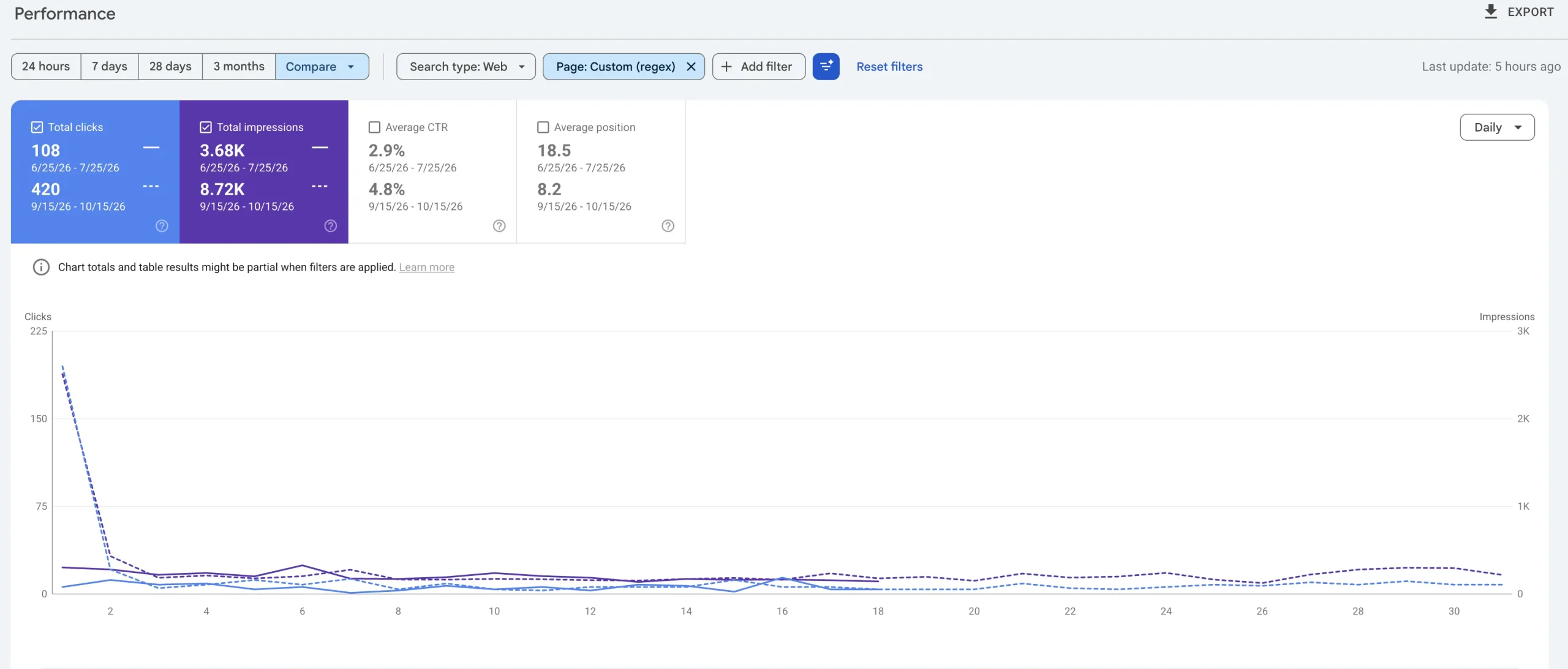
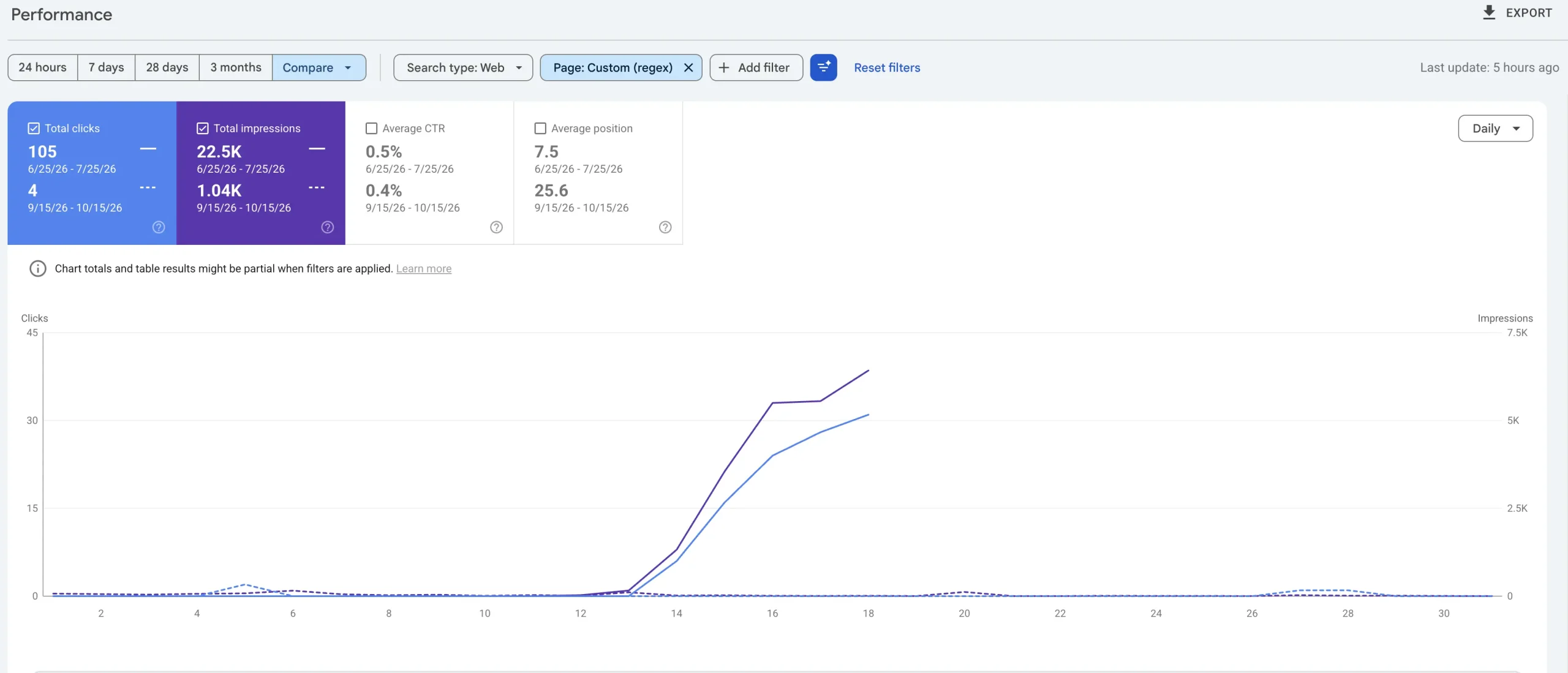
Heng Lai Furniture Carpentry came to us after malicious URL variations had started appearing in Google Search. Cleaning the website was only the first step. We also worked to remove the unwanted search footprint and restore visibility to the pages that should have been ranking.
Results shown are from this specific recovery and are not a guarantee of identical results for every website.
Spam URLs were replacing legitimate visibility.
The compromised WordPress website generated suspicious URL variations that appeared in Google Search. These URLs attracted clicks and impressions that should have belonged to genuine service and business pages.
We cleaned the website and addressed the search footprint.
We removed the malicious files and code, secured the affected WordPress installation, reviewed the unwanted URLs and helped Google recognise the legitimate website structure again.
Spam visibility collapsed while real pages recovered.
Clicks to suspicious URL variations fell from 105 to 4. During the same comparison, legitimate page clicks increased from 108 to 420 and impressions rose from 3.68K to 8.72K.
Our Services
Hacked?
Let’s fix it - starting at $125.
Full malware cleanup, backdoor removal, security hardening, and Google warning assistance, all within one clearly defined service. If the same infection returns within 30 days, we’ll investigate and re-clean the affected areas at no additional charge.
Request malware cleanupClient feedback
A WordPress client’s experience with Kiwistic
Real feedback from a client who trusted Kiwistic with WordPress cleanup, security improvements, and website updates.
Great service from start to finish. Professional!
Review text reproduced as published on Google.
FAQ
Questions about WordPress malware removal.
Clear answers about the cleanup process, pricing, timing, website access, the 30-day cleanup warranty, and what happens after you submit your request.
What are the signs my website might be infected with malware?
Your site may be infected if you notice: unexpected redirects to unknown websites, Google showing a red warning screen, visitors reporting pop-ups you didn’t add, sudden drop in traffic, your hosting provider suspending your account, or admin access being blocked. Any one of these is enough reason to act immediately.
What does your WordPress Malware Removal Service include?
Every cleanup includes a deep malware scan, full removal of infected files and backdoors, database cleaning, security hardening, and Google blacklist removal submission. Starting from $125 — no hidden fees.
How long does it take to remove malware from my website?
Most sites are fully cleaned within 60–90 minutes. Complex infections involving multiple backdoors or database corruption may take up to 3 hours. Work starts immediately after receiving your site details.
What happens if my website gets re-infected after your service?
Every cleanup includes a 30-day cleanup warranty. If the same infection returns on the same website within 30 days, we’ll investigate and re-clean the affected areas at no additional charge. The warranty covers a recurrence of the original infection. It does not cover a new compromise caused by newly installed software, changed or compromised access credentials, third-party account breaches, hosting-level security issues, or changes made after the cleanup.
Can I remove WordPress malware myself?
It’s possible, but risky. Missing a single backdoor means the site gets re-infected within days. A professional cleanup ensures every malicious file is found and removed including hidden entry points most DIY attempts miss.
Will my site lose Google rankings after a hack?
It depends on how long the site stays infected. The faster it gets cleaned and removed from Google’s blacklist, the better the chances of recovering rankings. Most clients see rankings stabilize within 2–4 weeks after cleanup.
How did my WordPress site get hacked?
The most common entry points are outdated plugins or themes, weak admin passwords, compromised hosting environments, and nulled (pirated) WordPress software. After cleanup, all known vulnerabilities get patched.
Ongoing protection
Don’t get hacked again.
Cleaning the infection solves the immediate problem. Ongoing WordPress maintenance includes automatic updates, daily backups, and security monitoring to help reduce the risk of future attacks.
See maintenance plansRequest malware removal
Tell us what happened
Share your website URL and describe the warning or suspicious activity. We’ll review the request, confirm the cleanup scope, and explain the next step before requesting secure access.
We’ll confirm the cleanup scope and next step before making changes.
Do not include passwords or sensitive login details in this form.