Home / WordPress Guides / WordPress Basics / Headless WordPress vs Traditional WordPress

Headless WordPress vs Traditional WordPress

TABLE OF CONTENTS

Free WordPress Site Review

Is your WordPress setup ready for what 2026 demands?

TL;DR

Traditional WordPress combines the front-end and back-end in one system, making it simple to manage but less flexible for custom designs. Headless WordPress separates them — you still manage content in WordPress, but the front-end is built separately (often with React or Vue) and pulls content through the REST API.

Choose Traditional WordPress for blogs, small business sites, and quick, budget-friendly setups; choose Headless WordPress for large-scale projects, content delivered across multiple platforms, or teams with strong development skills.

Introduction

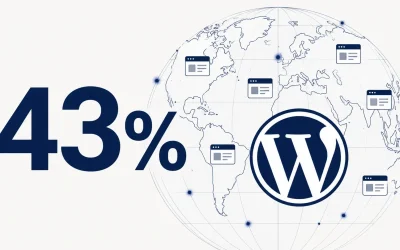
WordPress has come a long way since its launch in 2003. Originally, WordPress was just a blogging tool. Now, it’s a powerful content management system used by businesses, bloggers, and developers everywhere. Today, WordPress powers over 40% of all websites, showcasing its versatility and widespread adoption.

As WordPress evolved, so did the way people use it. Traditionally, WordPress combined the front-end (what users see) and the back-end (where you manage content) into one system. This is what we now call Traditional WordPress.

However, with the rise of new web development technologies, another approach has emerged: Headless WordPress. In this system, the back-end of WordPress is separate from the front-end. This lets developers use different tools, like React or Vue, to build custom front-ends.

Understanding the differences between Headless WordPress and Traditional WordPress is important for anyone looking to build a website today. Each approach has its own strengths and weaknesses, and choosing the right one depends on your website’s specific needs and goals. Whether you want full control over your design or a simpler setup, it’s important to choose the approach that fits your project best.

In this article, we’ll explore what makes Headless WordPress different from Traditional WordPress. Knowing these differences will help you choose the best option for your website.

What Is Traditional WordPress?

Traditional WordPress uses one system for both the front-end (what users see) and the back-end (where you manage content). This setup, known as a monolithic structure, connects both parts closely within WordPress.

How Traditional WordPress Works?
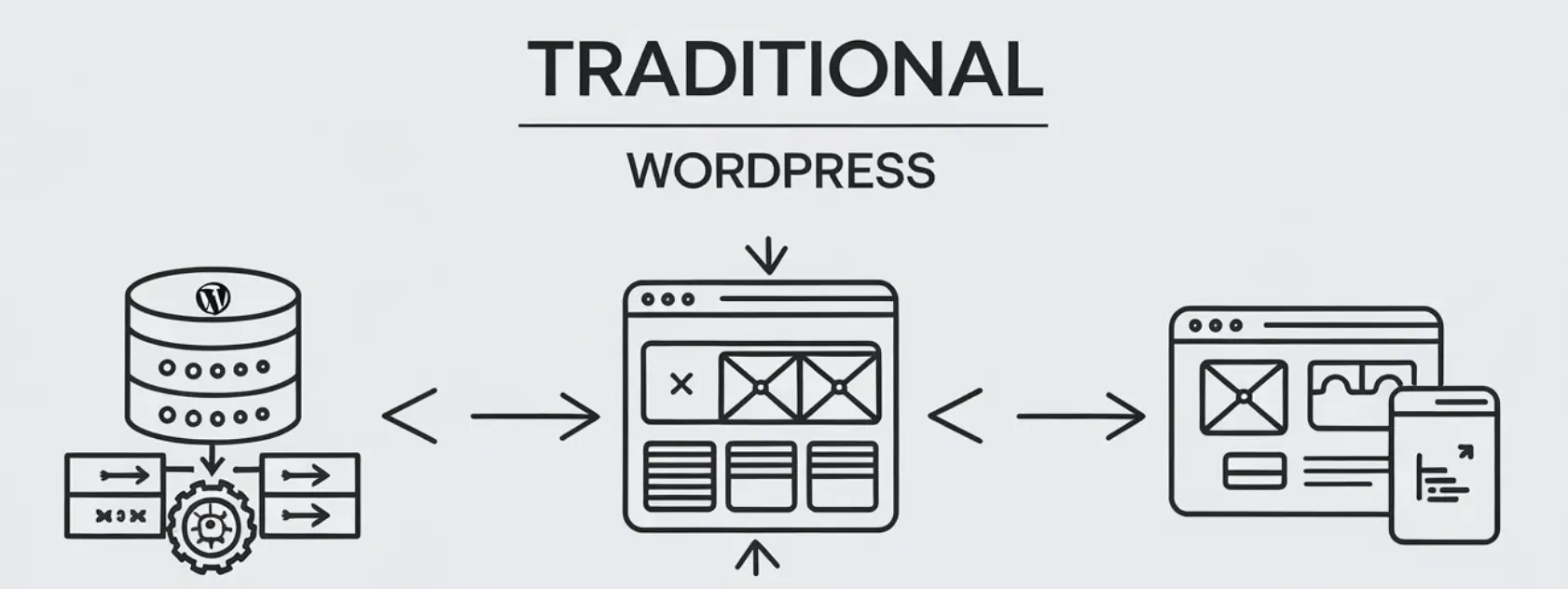
In Traditional WordPress, the back-end manages content creation, settings, and updates. The front-end then displays this content as a complete website for users. The front-end typically includes themes, templates, and plugins that define how the website looks and functions.
When you use Traditional WordPress, the platform generates web pages dynamically. When a visitor opens a page, WordPress retrieves the content from the database, processes it, and sends it to the browser as HTML. This setup makes it easy to update content and settings quickly, which many users find very convenient.
Headless WordPress vs Traditional WordPress: Traditional WordPress

Pros of Traditional WordPress

One of the biggest benefits of Traditional WordPress is its simplicity. The integration of the front-end and back-end means you can build and maintain a website without much technical knowledge. Most users can rely on pre-built themes and plugins to create their site, even with limited coding experience.

  • User-Friendly: WordPress offers a straightforward dashboard that simplifies content management and website customization.
  • Themes and Plugins: Traditional WordPress offers thousands of themes and plugins. These let you easily improve your site’s look and functions.
  • SEO Compatibility: With built-in features and additional plugins, WordPress is highly customizable for search engine optimization.
  • All-in-One System: Traditional WordPress combines the front-end and back-end. This makes building, editing, and updating websites easy.

Cons of Traditional WordPress

While Traditional WordPress is user-friendly, it does come with limitations, especially for larger, more complex websites. The monolithic structure can slow down performance because WordPress loads the entire page each time a visitor accesses it. This can lead to slower load times.
  • Performance Issues: Combining front-end and back-end can slow down larger sites with heavy traffic.
  • Limited Flexibility: Traditional WordPress doesn’t support modern tools like React, Vue, or Angular as well. These tools are popular for creating interactive sites.
  • Security Risks: Traditional WordPress can be more prone to security problems, especially if themes and plugins are outdated.
Next, we’ll compare it with Headless WordPress and look at the differences between Headless WordPress vs Traditional WordPress.

What Is Headless WordPress?

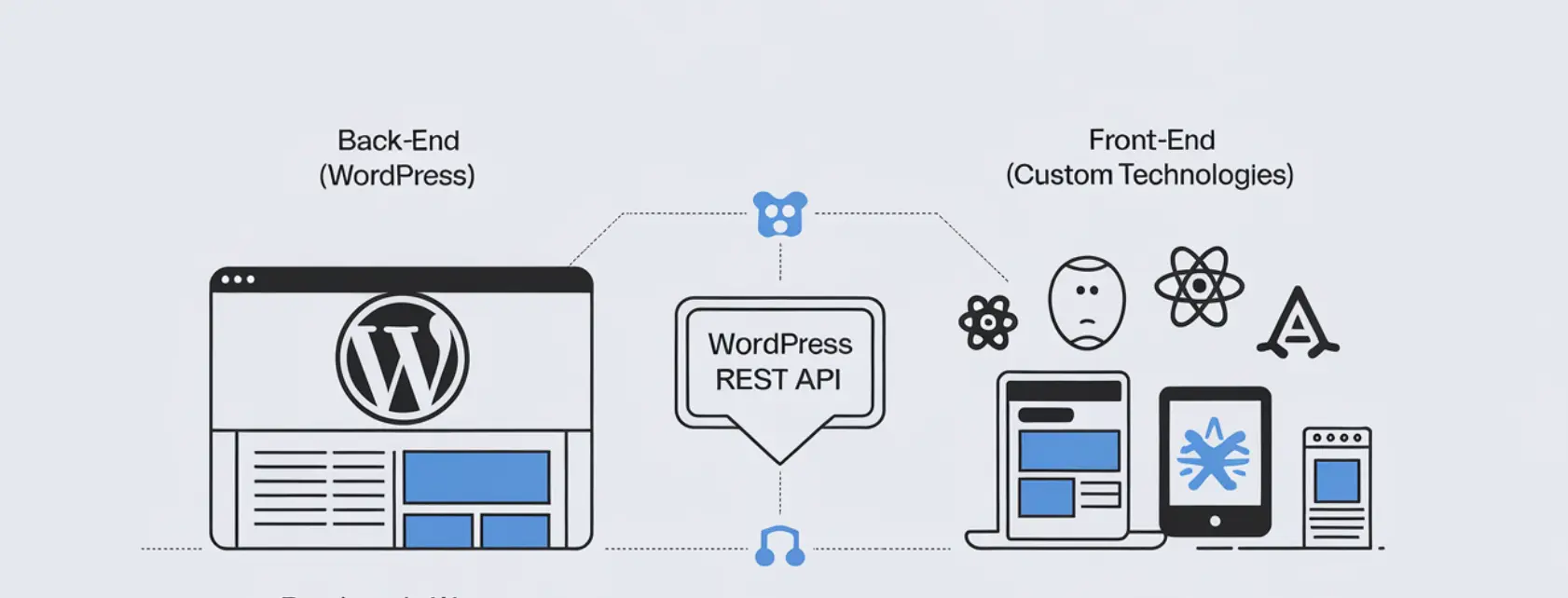
Headless WordPress is a modern way to build websites where the front-end (what users see) and back-end (content management) are separate. This allows developers to use WordPress for managing content and other technologies for designing and displaying the website. Instead of using WordPress themes, developers can use tools like React, Vue, or Angular to create more dynamic and customized websites.
Headless WordPress vs Traditional WordPress: Headless WordPress

How Headless WordPress Works?

In Headless WordPress, the back-end remains the same as in Traditional WordPress. You still use WordPress to create and manage your content, but the front-end is completely disconnected. Instead of WordPress generating the whole website for the user, it delivers content through APIs (Application Programming Interfaces).

The WordPress REST API is the most common API used. It lets developers get content from WordPress and show it on any platform, like mobile apps or websites. This separation makes Headless WordPress flexible. Developers can use almost any technology for the front-end and have full control over the design and features.

Benefits of Headless WordPress

Headless WordPress offers several advantages, especially for websites that need high performance, complex design, or integration with other platforms.
  • Greater Flexibility: Developers can use modern frameworks like React or Vue to create highly customized, fast-loading user experiences.
  • Improved Performance: Headless WordPress sites often load faster because the front-end is separate. Using a Content Delivery Network (CDN) can help too.
  • Scalability: Headless WordPress makes it easy to grow your site and use it on different platforms, like mobile apps, all from one place.
  • Reduced Attack Surface on the Front End: Since the public-facing site no longer runs WordPress themes and plugins directly, common front-end vulnerabilities tied to theme and plugin code are eliminated. The WordPress back-end itself still needs to be secured separately — headless doesn’t make wp-admin invisible on its own.

Limitations of Headless WordPress

While Headless WordPress brings many benefits, it also has a few drawbacks that users need to be aware of.
  • Increased Complexity: Building and maintaining a Headless WordPress website requires a lot more technical expertise. Developers need to be familiar with both WordPress and the front-end framework they’re using.
  • Loss of Some WordPress Features: Headless WordPress doesn’t support many built-in features, like themes and certain plugins, right away.
  • Cost and Time: Headless WordPress can cost more and take longer to set up because it needs custom work for the front-end.

Next, we’ll compare Headless WordPress vs Traditional WordPress and discuss when to choose each one.

Headless WordPress vs Traditional WordPress: Key Differences
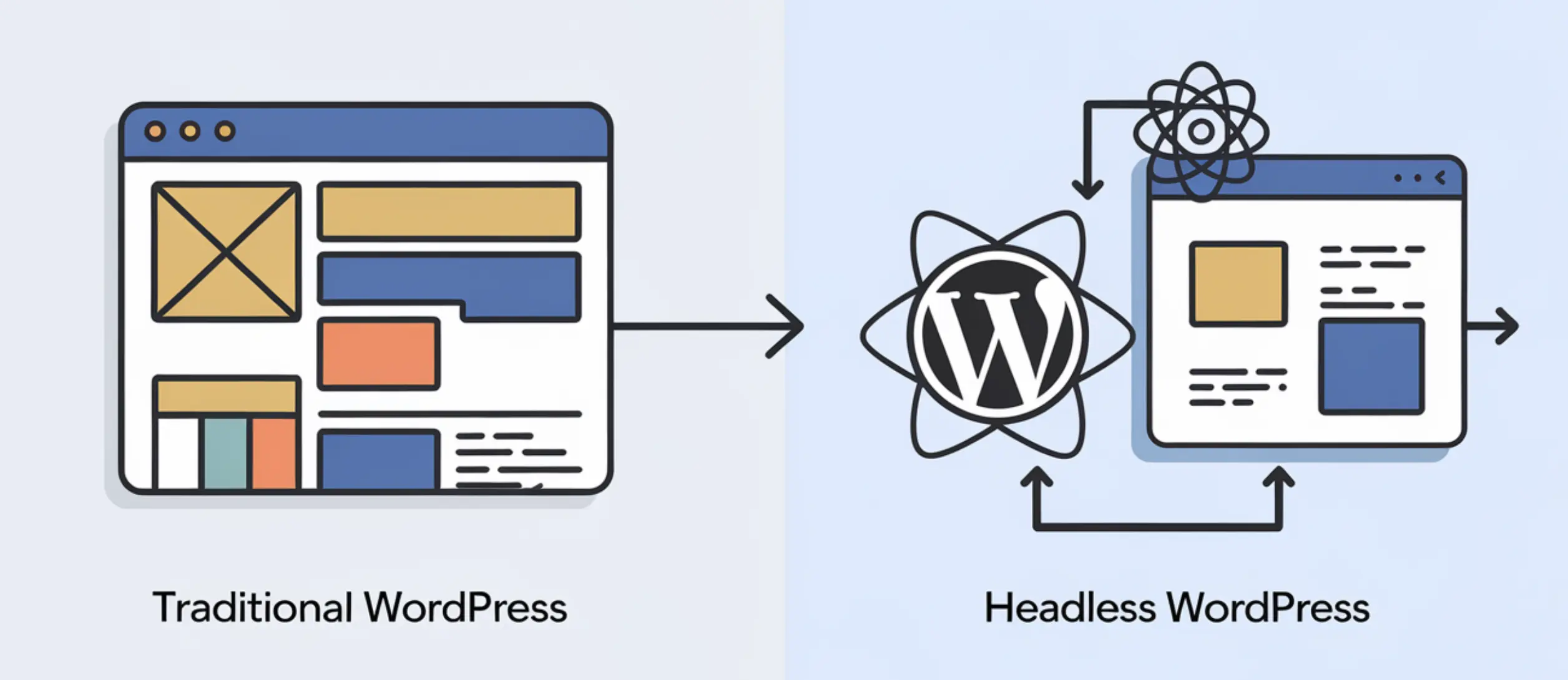
To choose between Headless and Traditional WordPress, compare their front-end management, flexibility, performance, SEO, and security. Let’s break down the key differences.
Headless WordPress vs Traditional WordPress: Key Differences

Front-End and Back-End Integration

In Traditional WordPress, the front-end (what users see) and back-end (where content is managed) are tightly integrated. WordPress themes and templates let you manage how your site looks and works. This makes it easy for both developers and content creators. This integration allows for easy content management, but limits flexibility in terms of design and user experience.

On the other hand, Headless WordPress decouples the front-end from the back-end. In Headless WordPress, you manage content in WordPress, but you can build the front-end with any technology, like React or Vue. APIs like the WordPress REST API make it possible to use custom designs while keeping WordPress for managing content.

Customization and Flexibility

Traditional WordPress offers many customization options through pre-built themes, page builders, and plugins, but these come with limitations. If you want a unique design, you might find the available themes limiting or need to hire developers to change them.

With Headless WordPress, customization options are almost limitless. With Headless WordPress, developers can design the front-end separately from WordPress. They can create custom experiences without being limited by WordPress themes. This is great for big websites, complex apps, or businesses needing unique, dynamic designs.

Performance and Speed

Performance is another key area where Headless WordPress vs Traditional WordPress differ. In Traditional WordPress, the system creates pages each time a visitor opens the site. This can slow down load times, especially for busy websites or pages with a lot of content.

Headless WordPress addresses this differently: rather than rendering the page on each request, the front-end can pre-build pages ahead of time (a technique called static site generation) or cache API responses aggressively, since the front-end framework controls exactly what gets requested and when. 

This is what typically gives headless sites their performance edge over Traditional WordPress, beyond just using a CDN.

SEO and Search Engine Visibility

SEO (Search Engine Optimization) is crucial for the success of any website. Traditional WordPress is good for SEO with plugins like Yoast SEO and All in One SEO. But if the site loads slowly, it can hurt SEO because everything is combined in one system.

With Headless WordPress, SEO requires a bit more effort. With Headless WordPress, developers must manually add SEO features like structured data and meta tags. But since it often loads faster and performs better, it can improve SEO if set up correctly.

Security Considerations

When comparing Headless WordPress vs Traditional WordPress, security is another crucial factor. Traditional WordPress sites can be more vulnerable to attacks because they use many themes and plugins in one system. If not updated, these can have security weaknesses.
Headless WordPress reduces one specific risk: since the public front-end doesn’t run WordPress theme or plugin code, front-end vulnerabilities tied to that code disappear.
But the WordPress back-end (wp-admin) is still there, and it’s still a target — going headless doesn’t secure it by itself. You still need strong passwords, limited login access, and regular updates on the WordPress side, plus proper authentication on the REST API to prevent unauthorized access to your content.
This section highlights the key differences between Headless WordPress and Traditional WordPress. It helps you decide which one is better for your website’s needs, like flexibility, performance, SEO, or security.

Which One Should You Choose?

Choosing between Headless WordPress and Traditional WordPress depends on your project needs, your team’s skills, and your long-term goals. Both have their strengths, but each is better suited to different types of websites and businesses.

When to Use Traditional WordPress?

For many websites, Traditional WordPress is the ideal choice. If you want a simple site that’s easy to manage and doesn’t need much development, Traditional WordPress is a good choice.
  • Content-Focused Sites: If your website is primarily a blog, portfolio, or business site where content is regularly updated, Traditional WordPress is ideal. It allows you to easily manage content without needing custom development.
  • Small Businesses or Personal Projects: Traditional WordPress is easy and affordable, perfect for small businesses or personal websites.
  • Budget and Time Constraints: If you need a quick and cheap setup, Traditional WordPress is faster and costs less. This is exactly the kind of site our WordPress development team builds efficiently without over-engineering it.

When to Use Headless WordPress

Headless WordPress is great for projects needing custom designs or content for different places, like mobile apps and websites. It’s ideal for companies looking to create a highly dynamic, scalable website or app.
  • Large-Scale Projects: Headless WordPress is good for big projects needing custom design, fast performance, and easy scaling.
  • Omnichannel Content Delivery: Headless WordPress works well for sharing content on websites, apps, and other platforms.
  • Developer-Heavy Teams: If your team knows advanced tech like React or Vue, Headless WordPress helps you create more complex sites. If you don’t have that team in-house, our development team can scope and build a headless setup for you from the ground up.

Headless WordPress vs Traditional WordPress: Real-World Use Cases

To show how Headless and Traditional WordPress differ, let’s look at real examples of businesses using each.

Traditional WordPress Example

A small local bakery uses Traditional WordPress for their website. They use a simple design with a standard theme and plugins to handle online orders, show their menu, and post event updates. They don’t need advanced features. Managing everything from one dashboard makes it easy for the owner to update the site without a developer.
For this bakery, Traditional WordPress is a great choice. It’s affordable and easy to manage, meeting their needs without needing complex customizations.

Headless WordPress Example

A large eCommerce brand uses Headless WordPress to power their website and mobile app. Their marketing team uses WordPress to manage content, while React powers the front-end for a dynamic shopping experience. Headless WordPress helps them deliver fast, smooth content across different devices, all from one place in WordPress.
Headless eCommerce

For this company, Headless WordPress is a great fit. It lets them create a modern shopping site that works well with their app and other platforms.

Conclusion

Choosing between Headless WordPress and Traditional WordPress depends on what your website needs. Both approaches have distinct strengths and limitations, and understanding these differences is key to making the right choice.

Traditional WordPress combines the front-end and back-end, making it great for small businesses, blogs, and personal projects. It’s cost-effective, easy to manage, and allows for rapid deployment with minimal technical knowledge.

Headless WordPress separates the front-end from the back-end, allowing for custom designs and better performance. It’s best for large projects, businesses needing content on multiple platforms, and teams with strong development skills.

When choosing between Headless WordPress vs Traditional WordPress, consider your business goals, project complexity, and budget. If you need a fast, easy way to manage content with little development, Traditional WordPress is a great choice. For a more flexible, scalable, and customizable solution, Headless WordPress is better.

At Kiwistic, our WordPress development team can help you choose the right setup for your needs — whether that’s a Traditional WordPress site or a full Headless build. Whether you need a simple site or a complex, multi-platform solution, we’re here to help your website perform at its best.

FAQ

Can I switch an existing Traditional WordPress site to Headless later?
Yes, but it’s a significant rebuild, not a simple toggle. You’d keep your WordPress back-end and content, but the entire front-end would need to be rebuilt using a framework like React or Vue, connected through the REST API.
Do I lose the WordPress admin dashboard with a headless setup?
No. You still log into wp-admin and manage posts, pages, and media exactly as before. The difference is that visitors never see WordPress-rendered pages — they see the custom front-end pulling that content through the API instead.
Can I still use WordPress themes with Headless WordPress?
Not for the front-end that visitors see, since that’s built separately with a framework like React or Vue. WordPress themes are a Traditional WordPress concept; in a headless setup, the “theme” is effectively the custom front-end application itself.
Is Headless WordPress more expensive to maintain long-term?
Generally yes, since you’re maintaining two systems instead of one: the WordPress back-end and the separate front-end application, each with its own updates, hosting, and potential issues. Traditional WordPress consolidates that maintenance into a single system.
Does Headless WordPress work well with WooCommerce?
It can, but it requires more setup than a standard WooCommerce store. You’d need to build custom front-end components for cart, checkout, and product pages that pull data through the WooCommerce REST API, rather than using WooCommerce’s built-in templates.
What skills does my team need to manage a Headless WordPress site?
Beyond standard WordPress knowledge for the back-end, you need a developer comfortable with a modern JavaScript framework (React, Vue, or similar) and API integration. This is the main reason Headless WordPress suits developer-heavy teams rather than solo site owners.

Ognjen Velickovic

WordPress Developer & Product Manager at Kiwistic. I build and maintain WordPress sites for small businesses and troubleshoot everything from login lockouts to security issues. These guides come from real experience, so you don't have to figure it out alone.

You May Also Like…